Block yourself.
Not your kids.

Every other screen time app treats you like a child to be monitored. SproutGuard is a wall you build for yourself — block distracting apps and websites, no account, no cloud, nothing leaves your phone.

Download free on iOS

Free · No sign-up · Runs on Apple Screen Time

Check before you tap Get: iPhone only, requires iOS 18 or later, and is currently available on the US, UK, Canada, Australia, Ireland, and New Zealand App Stores.
QR code linking to SproutGuard on the App Store
On desktop? Scan once on your iPhone and open the App Store page directly.

Best for / not for

Best for

Adults who want to block their own apps and websites, start deliberate focus sessions, and keep a streak that makes overrides feel expensive.

Not for

Parents needing remote monitoring, family dashboards, GPS, or a tool that works on someone else's phone without their consent.

This matters because the category is full of parental-control products disguised as self-control apps. SproutGuard is for the opposite case: you are the person choosing the wall.

The problem with every other blocker

"My parents installed this. I cannot use the internet without fear of being monitored."

— Real review of a leading "self-control" app

Most screen time apps are parental control tools wearing a productivity costume. They assume someone else needs to police you. The rest want an account, a subscription, and your usage data on their servers.

SproutGuard assumes the opposite: you're an adult who already knows the problem. You just want a wall — and you want to be the one who builds it.

What it does

Block what eats your day

Pick the exact apps and websites that pull you in. Put a wall between you and the endless scroll, whether it lives in an app or in Safari.

Focus sessions

Start a session and stay locked in until you're done. No negotiating with yourself mid-task.

Streaks that stick

Build a daily streak. Watching the number climb is what turns a good intention into a habit.

Watch the hours drop

See your real usage and watch it fall week over week. Progress you can actually point at.

What is free before you pay anything

Free

Blocking, focus sessions, and streaks are available without creating an account or starting a trial.

Optional Premium

Unlimited rules and weekly insights are part of the optional auto-renewing subscription. The free tier does not expire.

That distinction matters because this category is full of fake-free blockers that let you set everything up, then turn the wall off unless you subscribe. SproutGuard's core is usable before you pay anything.

Start with Apple’s free tools if they’re enough

Built-in Screen Time is enough if…

You mainly need a clean app-or-website block, can live with Apple’s raw settings, and do not need extra motivation once the wall is in place.

SproutGuard helps when…

The technical block already works, but you keep backing out. Sessions, streaks, and a clearer adult-first setup add cost to the moment you would otherwise override it.

That honesty matters. The right first answer for a lot of people really is Apple’s free Screen Time. SproutGuard is for the point where the missing piece is not capability, but friction and follow-through.

What people actually block

Instagram →

Close both the app and Safari route, not just the icon on your home screen.

Facebook Reels →

The honest workaround when you cannot block only the Reels tab without blocking Facebook itself.

TikTok →

Handle the web player, short-link domain, and reinstall loophole before the block collapses.

Reddit →

For when the habit simply migrates from the app to reddit.com in Safari.

Discord →

Block the app, the browser path, and discord.gg invite links together.

Bluesky →

Block the app, bsky.app, and go.bsky.app shared-link routes together.

Threads →

Block the app, threads.net, and the Instagram handoff route together.

LinkedIn →

Block the app, linkedin.com, and lnkd.in short links together.

Pinterest →

Block the app, pinterest.com, and pin.it short-link routes together.

Safari →

When the browser itself is the relapse route, not just one app or one website.

Messenger →

Block the app, the browser path, and m.me link escape hatches together.

X / Twitter →

Block the app, x.com, and legacy twitter.com link routes together.

Telegram →

Block the app, the web client, and t.me link routes together.

Snapchat →

Block the app, the web client, and the shared-link escape hatch together.

WhatsApp →

Block the app, the web client, and the wa.me link escape hatch together.

Facebook →

Block the app, the browser path, and the shared-link escape hatch together.

Reels →

The honest workaround when you cannot block only the Reels tab on Instagram or Facebook.

YouTube →

Block the app, Safari, and the short-link route together — not just Shorts.

Why most blocks fail

App-only blocking

You delete the icon, then open the exact same feed in Safari five minutes later.

Shared-link escape hatches

m.me, wa.me, x.com, and invite links become the remembered fallback.

Unlocked settings

If tired-you can remove the block in ten seconds, the block is real only on paper.

No cost to backing out

The technical wall works better when a streak or session makes overrides feel expensive.

Download free on iOS

See it

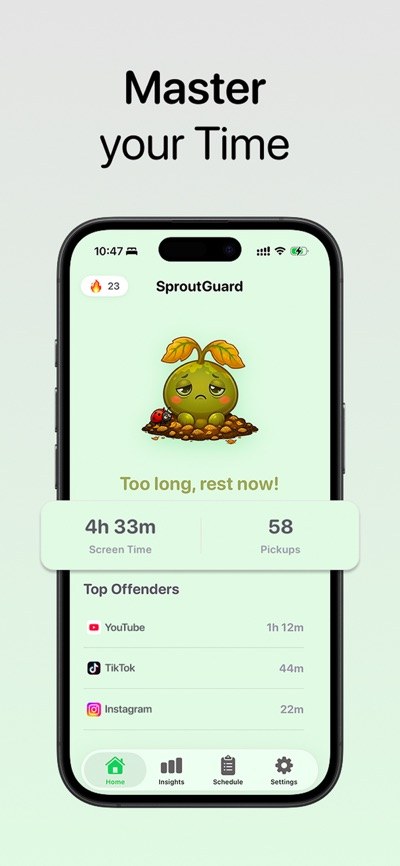
Your day, your streak, your call — all on your phone.

SproutGuard home screen showing daily screen time, pickups and top distracting apps
Where your day actually went
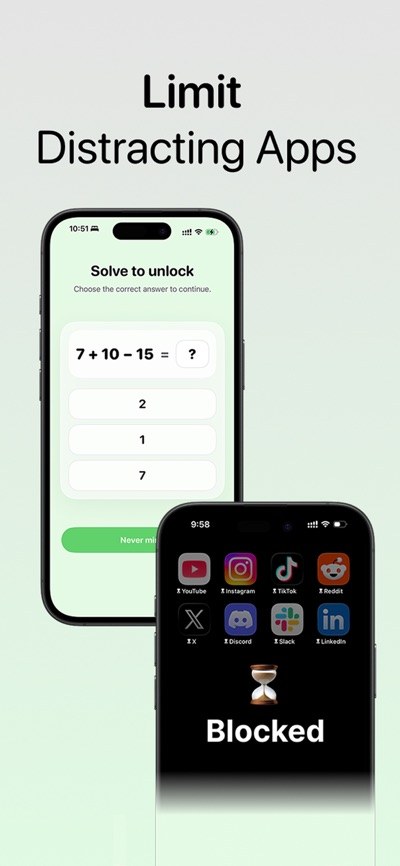
Blocking distracting apps with a mindful pause challenge
A wall, plus a pause
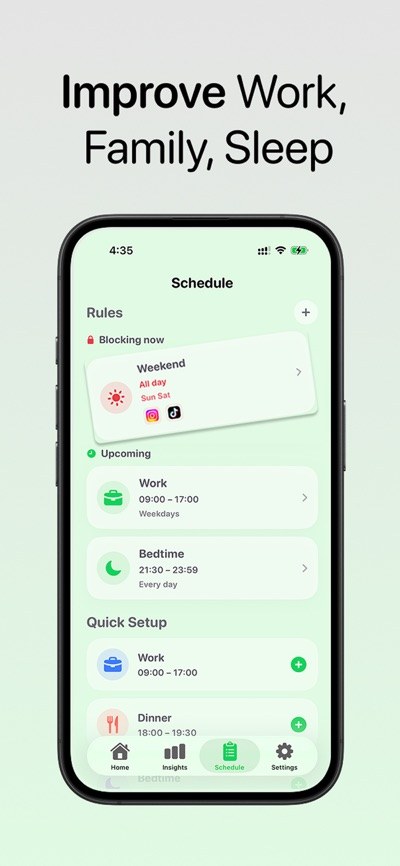
Focus schedules for work, family time, dinner and bedtime
Focus schedules
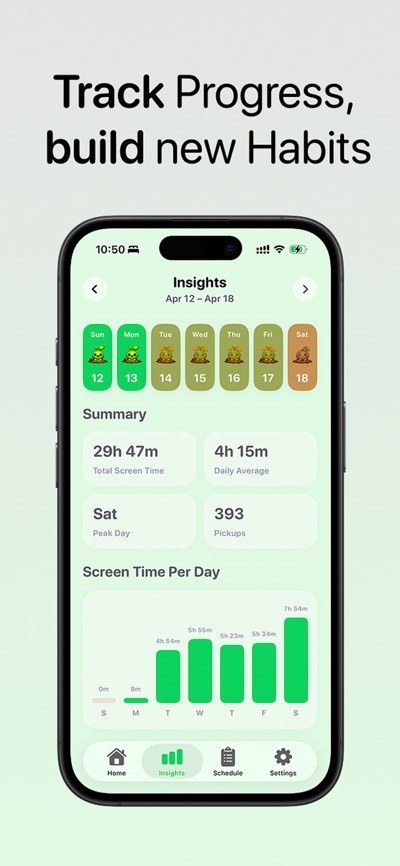
Weekly progress tracking and habit streaks
Streaks that stick

Download free on iOS

Private by design

Download free on iOS

FAQ

Is this a parental control app?
No — and that's the whole point. SproutGuard is designed for you to block yourself. There's no monitoring dashboard, no reports, no second party.
Do I need to create an account?
No. There is no sign-up, no login, and no backend. Nothing about your usage leaves the device.
How does the blocking work?
It's built on Apple's own Screen Time framework, so app and website blocking happen at the system level, entirely on-device.
Is it free?
Yes. The core — blocking, focus sessions, streaks — is free. Premium — unlimited rules and weekly insights — is an optional auto-renewing subscription. The free tier is not a trial and does not expire.
What do I need to run it?
An iPhone on iOS 18 or later. It's iPhone-only right now — there's no iPad app yet. Worth checking before you tap Get.
What if I just turn it off?
You can. It's your phone and your call. The streak is the point: the friction plus the number you don't want to reset is what actually changes behavior.

Set up in 60 seconds

1 · Open it

No sign-up screen, no email, no onboarding survey. The app opens straight into the thing you came for.

2 · Pick your apps

Choose the exact apps that eat your evening. Apple's own picker — SproutGuard never sees which ones you chose.

3 · Start a session

The wall goes up at the system level. Your streak starts counting the same day.

Requires iPhone on iOS 18 or later (iPad is not supported yet). Requires granting Screen Time permission — that's Apple's system prompt, and it's what makes blocking real instead of advisory.

Free tool

Screen time calculator →

Enter your daily hours and see the same number as full days per year and as waking years of the life you have left. No sign-up, runs entirely in your browser — and you can save your result as an image or share a link that opens on your exact numbers.

Embeddable screen time widget →

For bloggers, newsletters, and digital-wellbeing sites: copy one iframe snippet and publish the calculator on your own page. No tracking script, no cookie, no callback to us — the arithmetic runs on your reader's device.

asorank — App Store keyword rank checker →

An open-source command-line tool we built and released for free while working out why nobody could find this app. Checks where any iOS app ranks in App Store search for any keyword. No API key, no account, no dependencies. MIT licensed.

Follow SproutGuard by feed →

A no-email updates feed for new guides, calculator changes, and debugging write-ups. Works as RSS/Atom and as JSON Feed for readers, link roundups, and static-site subscribers who do not want email.

Guides

QR code linking to SproutGuard on the App Store

Reading this on a computer?

SproutGuard is an iPhone app, so there is nothing to install here. Point your iPhone camera at this code and it opens straight to the App Store page.

Currently available on the US, UK, Canada, Australia, Ireland and New Zealand App Stores. Free, no account, nothing leaves your device.